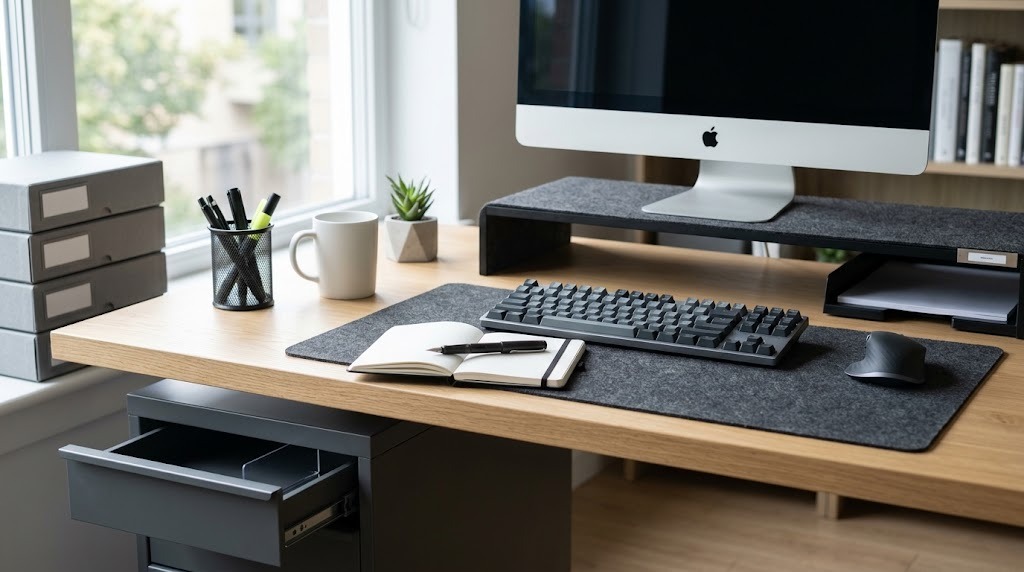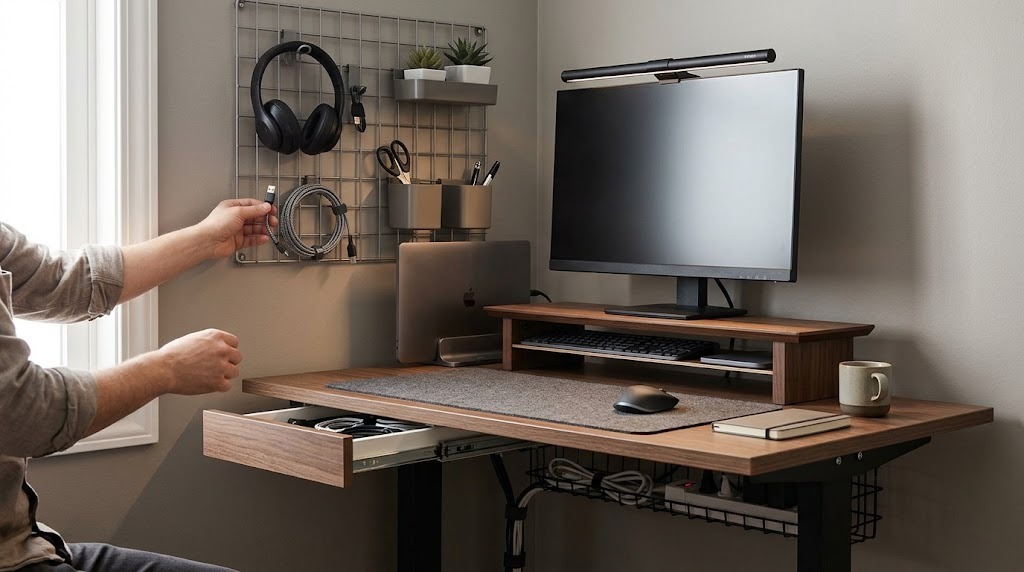
Desk organization is the systematic arrangement of workstation tools, technology, and materials to minimize cognitive load and physical friction. By strategically categorizing items into ergonomic reach zones and eliminating visual clutter, professionals can decrease task-switching costs, eliminate search time, and improve focused productivity.

At a Glance
- Primary Objective: Reduce visual noise and physical friction to lower the brain’s cognitive processing requirements during deep work.
- The 90-Day Rule: Any item not used in the past 90 days (excluding vital tax/legal documents) should be archived off-desk or discarded.
- Ergonomic Zones: Desktop items must be arranged by frequency of use into Primary (hourly), Secondary (daily), and Tertiary (weekly/monthly) reach zones.
- Infrastructure Investment: A functional, lifelong organizational foundation (monitor arm, cable tray, desk mat) typically costs between $75 and $380.
- Maintenance: Sustainable organization requires a 5-minute weekly reset and a comprehensive quarterly overhaul.
The Science of Desk Organization
Desk organization works by manipulating two distinct biological factors: visual processing capacity and biomechanical efficiency.
When a desk surface is cluttered, multiple visual stimuli compete for neural representation in the visual cortex. This competition severely limits the brain’s processing capacity, leading to rapid cognitive fatigue. Organizing a desk removes this “visual noise,” allowing the brain to focus entirely on the active monitor or document.
Physically, organization relies on ergonomic reach zones. By placing tools according to how frequently they are used, you decrease the micro-strains associated with leaning, stretching, and searching.
How to Organize Your Desk: The CLEAR Method
To systematically organize any workstation, execute the CLEAR framework. This process takes approximately 1 to 3 hours depending on initial clutter volume.
Before You Start:
- Time Required: 1–3 hours.
- Difficulty: Moderate (requires decision-making).
- Materials Needed: 3 large cardboard boxes (for sorting), a trash bag, microfiber cloth, multi-surface cleaner, hook-and-loop cable ties.
Step 1: Clear Out Entirely
Remove absolutely everything from the desk surface, interior drawers, and surrounding shelves. Place all items into a temporary holding zone on the floor or a nearby table.
- Specifics: Wipe down the bare desk with a multi-surface cleaner. You must start with a completely blank canvas; moving items around an already cluttered desk is merely shuffling, not organizing.
- Success Checkpoint: You will know it worked when your desk resembles a floor model in a furniture showroom—zero items remaining.
Step 2: Log and Categorize
Group your displaced items into strict functional piles based on their purpose.
- Specifics: Create five distinct zones on the floor: Tech & Cables, Writing Instruments, Active Documents, Reference Materials, and Personal/Decor.
- Common Mistake: Mixing categories (e.g., placing a sentimental pen in the “Decor” pile instead of “Writing Instruments”). Group strictly by function.
Step 3: Eliminate and Archive
Purge items that are broken, expired, or unused to protect your future desktop real estate.
- Specifics: Apply the 90-Day Rule. If you have not touched an item in the last 90 days, it does not belong on your desk. Archive reference materials in a closet, digitize old notes, and throw away dried pens.
- Success Checkpoint: Your total inventory should be reduced by at least 30% before anything goes back onto the desk.
Step 4: Arrange by Ergonomic Zones
Return essential items to the desk based strictly on physical reach constraints and frequency of use.
- Primary Zone (0–16 inches / Horizontal Reach): Items touched hourly. This includes your keyboard, mouse, active notebook, and phone. Keep this zone 80% empty.
- Secondary Zone (16–24 inches / Arm’s Length): Items used daily. This includes pens, active project binders, and a water glass.
- Tertiary Zone (24+ inches / Requires Lean/Stretch): Items used weekly or monthly. This includes printers, backup drives, and long-term file sorters.
Step 5: Review and Maintain
Establish a recurring maintenance schedule to prevent the gradual accumulation of new clutter.
- Specifics: Set a calendar reminder for a 5-minute “Friday Reset” where you return all primary zone items to their designated homes. Schedule a 60-minute deep overhaul every quarter to re-evaluate the 90-Day Rule.
Desk Setup Archetypes
Desk setups typically fall into four functional categories based on specific work requirements. Identifying your archetype dictates which organizers you should purchase.
Tech & Digital-Heavy
This setup maximizes screen real estate and prioritizes severe cable management.
- Features: Dual pneumatic monitor arms, under-desk steel cable trays, multi-device Thunderbolt docking stations, and zero paper storage.
- Best For: Software engineers, video editors, and remote corporate executives.
Paper & Administrative
This setup prioritizes document flow, fast retrieval, and physical processing pipelines.
- Features: Multi-tier horizontal desk trays, vertical file slots, desktop letter sorters, and mobile rolling cabinets.
- Best For: Lawyers, accountants, and administrative professionals handling high-volume compliance documentation.
Creative & Craft-Focused
This setup prioritizes high-capacity, highly visible tool storage, accepting more visual density in exchange for rapid tool access.
- Features: Modular wall pegboards, clear acrylic drawer inserts (to recognize materials instantly), and rolling utility carts.
- Best For: Designers, hardware engineers, and traditional artists.
Minimalist
This setup eliminates all non-essential items from visual view, focusing purely on aesthetic calm and absolute zero distraction.
- Features: Single hidden drawer units, embedded wireless chargers flush with the desk surface, and sleek leather desk mats.
- Best For: Writers, deep-work strategists, and users easily distracted by peripheral objects.
Comparing Structural Storage Approaches
Choosing how to store your items structurally dictates your long-term success. Desk depth (the distance from the front edge to the back edge) should drive this decision.
| Approach | Typical Components | Pros | Cons | Best For |
| Vertical Storage | Pegboards, wall shelves, monitor risers, slatwalls. | Frees up desktop surface area; keeps tools at eye level. | Requires drilling/mounting; items collect dust quickly. | Shallow desks (under 24″ deep) and creative workers. |
| Horizontal Storage | Desk mats, letter trays, catch-all trays, pencil cups. | Incredibly easy to reconfigure; everything within immediate reach. | Rapidly consumes raw desktop space; highly prone to clutter creep. | Deep desks (30″+ deep) and high-volume paper handling. |
| Hidden Storage | Under-desk drawers, cable management boxes, filing cabinets. | Creates a distraction-free aesthetic; protects electronics from dust. | “Out of sight, out of mind” can cause forgotten tasks; slower access. | Minimalists and corporate professionals with purely digital workflows. |
Workspace Infrastructure & Component Costs
A well-organized desk relies on structural components rather than cheap plastic bins. The table below details typical market costs, physical footprints, and lifespans for standard organizational infrastructure.
| Component | Primary Function | Average Price Range | Setup Time | Expected Lifespan |
| Desk Mat / Blotter | Defines the primary work zone; protects surface. | $20 – $80 | 1 min | 2 – 5 years |
| Monitor Arm | Clears horizontal desktop footprint by elevating screens. | $40 – $250 | 20 – 45 mins | 10+ years |
| Cable Management Tray | Hides wires, power strips, and bulky charging bricks. | $15 – $50 | 15 – 30 mins | Lifelong (if steel) |
| Drawer Organizers | Divides large drawer space into tight grid configurations. | $10 – $35 | 5 mins | Lifelong |
| Pegboard System | Utilizes vertical wall space directly above the monitor. | $30 – $120 | 30 – 60 mins | 10+ years |
| Desktop Document Tray | Houses active, incoming, and outgoing physical paperwork. | $15 – $40 | 1 min | 5 – 10 years |
Common Mistakes and Troubleshooting
The “Out of Sight, Out of Mind” Trap
Storing active, pending paperwork inside closed drawers or deep cabinets inevitably causes missed deadlines or forgotten tasks.
- The Fix: Implement a transparent vertical desktop sorter strictly for Actionable, Pending, and To-File papers. If a project is live and requires action this week, its core file must remain visually tracked in your secondary zone.
Over-indexing on Containers
Buying complex organizers, bins, and labels before purging your current clutter results in neatly organized trash.
- The Fix: Never buy organizers first. Follow the CLEAR method: purge and categorize completely, use cardboard boxes as temporary prototypes for a week to gauge workflow, and only buy permanent containers once your daily volume is locked in.
Cable Spaghetti
Power bricks and loose cords hanging under the desk catch on feet and act as a massive visual distraction, breaking the aesthetic of an organized space.
- The Fix: Mount a heavy-duty wire basket or steel J-channel tray under the back edge of the desk. Anchor power strips inside the tray using heavy-duty mounting tape. Bunch slack cables together with hook-and-loop ties (never zip-ties, which require cutting to modify), and run a single consolidated power cord down the desk leg using a neoprene cable sleeve.
Lighting Neglect
Organizing physical objects perfectly but ignoring illumination leads to eye strain, forcing users to lean forward into their primary zone and disrupting posture.
- The Fix: Install a monitor light bar to cast asymmetrical light straight down onto the primary zone, reducing screen glare while illuminating your keyboard and active documents without taking up desktop space.
Expert Profiles by User Type
The Remote Digital Executive
This setup focuses on eradicating cognitive fatigue, optimizing video background aesthetics, and maximizing hardware efficiency.
- Setup Blueprint: Pair a premium wool felt desk mat with a dual-motor pneumatic monitor arm to float displays. Install an under-desk steel cable tray to hide all power bricks.
- Expert Tip: Keep only three non-tech items on the desktop at any time (e.g., one notebook, one pen, one beverage container). Run a single Thunderbolt cable to your laptop to handle charging, display, and data simultaneously.
The Paper-Heavy Professional (Legal, Finance, Admin)
This setup focuses on fast, frictionless document retrieval and clear processing pipelines.
- Setup Blueprint: Implement a 3-tier horizontal stacking tray on the dominant-hand side of the desk labeled: Inflow, Processing, and Outflow. Position a mobile rolling file cabinet directly underneath the desk’s secondary reach zone for active client folders.
- Expert Tip: Dedicate the final 15 minutes of Friday afternoon strictly to scanning physical documents to a secure cloud drive and running the physical papers through a micro-cut shredder to prevent Monday morning backlog.
The Creative / Maker
This setup focuses on visual inspiration and high-density tool availability without structural chaos.
- Setup Blueprint: Install a modular steel pegboard directly on the wall behind the desk surface. Use clear acrylic bins inside drawers so varied materials remain instantly recognizable. Utilize a 3-tier rolling utility cart next to the desk to hold active project components.
- Expert Tip: Group physical tools by artistic medium or project type rather than tool shape. Keep “like with like” so entire workflows can be brought to the desk and put away simultaneously, rather than hunting for scattered components.
Frequently Asked Questions
How do I organize a desk that has no built-in drawers?
Maximize vertical space and floor space. Install a wall-mounted pegboard or floating shelves above the monitors for secondary-zone items. Below the desk, invest in a 3-drawer mobile filing pedestal that rolls under the surface to replicate the function of built-in storage.
What is the best way to hide laptop wires on a glass desk?
Glass desks eliminate the ability to screw trays underneath. Use an opaque cable management box placed on the floor to house the power strip and bulky bricks. Route the essential cables up the back of one desk leg using adhesive-backed cable clips or a flexible, spine-style cable manager.
How often should I completely reorganize my workspace?
Micro-maintenance should happen weekly, but a complete reorganization should occur every 90 days. Quarterly overhauls allow you to adapt your setup to changing project requirements, test new workflow systems, and ruthlessly apply the 90-Day rule to newly accumulated clutter.
Does a desk mat actually help with organization?
Yes. A desk mat serves as a physical boundary for your primary work zone. It subtly trains the brain to keep non-essential items outside of its perimeter, acting as a structural anchor that prevents clutter from creeping directly in front of your keyboard.