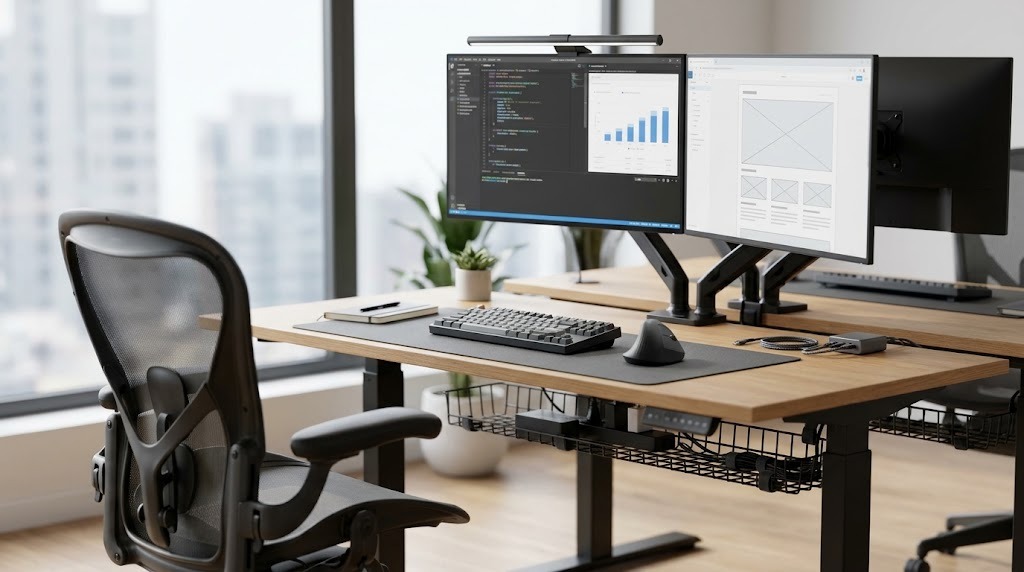
An office setup refers to the intentional arrangement of physical furniture, technology, and environmental elements within a workspace to optimize productivity, comfort, and physical health. A properly calibrated workspace reduces physical friction, eliminates repetitive strain injuries, minimizes cognitive distractions, and triggers a focused psychological mindset for sustained work.
Key Facts / At a Glance
- Minimum desk depth requires 60 cm (24 inches) to allow safe focal distance for standard monitors.
- Ergonomic chair calibration must ensure flat feet, a supported lumbar curve, and parallel elbows.
- The ideal sit-stand routine dictates 15 minutes of standing for every 45 minutes of seated work.
- Workspace lighting requires a monitor light bar with a Color Rendering Index (CRI) above 90 to eliminate screen glare.
- Professional office setup budgets range from $300 for budget entry builds to over $5,000 for high-end infrastructure.
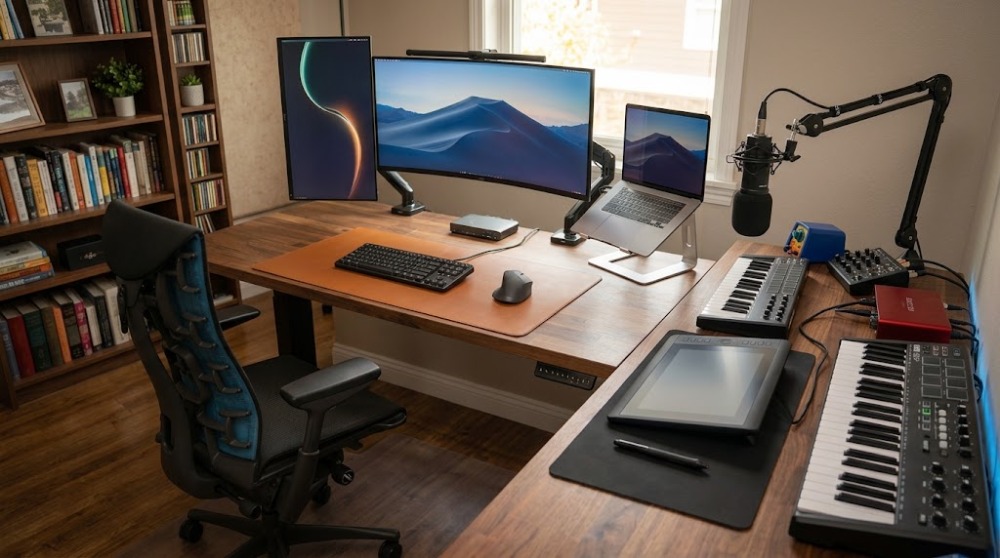
What Are the Best Office Setup Ideas?
The best office setup ideas categorize into four distinct architectural layouts: the Ergonomic Health-Focused Setup, the Minimalist Tech-Forward Setup, the Creative Maker’s Setup, and the Multi-Zone Small Space Setup. Your primary profession, hardware requirements, and available square footage dictate which specific configuration will maximize your daily output.
1. The Ergonomic Health-Focused Setup
The ergonomic setup prioritizes biomechanical alignment over visual aesthetics, utilizing highly adjustable seating, split mechanical keyboards, and articulated monitor arms. This layout serves full-time remote workers and power users who face chronic fatigue or repetitive strain injury (RSI) risks. By isolating the body’s posture, this setup boosts sustained focus during eight-hour blocks. The primary drawback involves a high initial financial investment and the requirement for precise, millimeter-level adjustments to function correctly.
2. The Minimalist Tech-Forward Setup
The minimalist setup leverages single-cable docking solutions and wireless peripherals to eliminate visual clutter entirely. Programmers, writers, and digital minimalists benefit most from this visually quiet environment. A single Thunderbolt dock routes power, display output, and internet to a laptop, keeping the actual desk surface pristine. While incredibly easy to keep clean, this office setup idea sacrifices on-desk storage and limits secondary display areas for physical reference documents.
3. The Creative Maker’s Setup
The creative setup utilizes massive horizontal working surfaces (often L-shaped desks exceeding 72 inches) to segment physical project zones from digital editing bays. Video editors, hardware engineers, and traditional artists require this footprint to manage physical tools alongside digital interfaces. This layout provides massive surface area but requires significant floor space and introduces extreme cable management complexity to route power across multiple distinct zones.
4. The Multi-Zone / Small Space Setup
The multi-zone setup utilizes drop-front secretary desks, wall-mounted floating surfaces, or rolling carts to fit inside shared environments. Apartment renters or hybrid workers sharing bedrooms must rely on these compact footprints. This configuration offers a tiny visual footprint and hides away outside of working hours, preventing stress-signal bleeding. However, users must compromise heavily on physical desktop space and limit their gear to single-monitor configurations.
Comparative Setup Matrix
| Setup Type | Best Suited For | Key Advantages | Main Trade-offs |
| Ergonomic Health | Remote workers, data analysts | Eliminates RSI risks; sustains long-term focus. | High cost; requires strict posture discipline. |
| Minimalist Tech | Writers, software developers | Zero visual clutter; cognitive ease. | Zero storage; relies heavily on cloud/digital systems. |
| Creative Maker | Video editors, hardware engineers | Segmented zones; massive workspace. | Huge physical footprint; cable routing nightmares. |
| Multi-Zone / Small | Apartment renters, shared rooms | Hides away entirely; affordable. | Shallow desk depth; limited monitor support. |
How Do You Calibrate Your Office Setup?
You ergonomically calibrate an office setup by systematically aligning your chair to your body, integrating your desk height to your arms, and setting your display distance to protect your cervical spine. This three-phase process isolates physical variables to eliminate joint strain.
Phase 1: Chair Calibration (Body Isolation)
The chair dictates the geometry of the rest of the workspace. Never adjust your body to the desk; adjust the chair to your body first.
- Set Baseline Height: Raise your chair to its highest point, sit deep into the seat pan, and lower the cylinder until your feet rest entirely flat on the floor with zero pressure cutting into the back of your thighs.
- Align Lumbar Support: Move your backrest vertically so the primary molded lumbar curve snaps perfectly into your anatomical belt line.
- Check Seat Depth: Maintain a rigid 2-to-3 finger gap between the back of your knees and the front edge of the seat cushion to preserve lower leg blood circulation.
- Relax the Arms: Slide the armrests to a height slightly below your natural resting elbow height. Your shoulders must drop effortlessly without hunching upward.
Phase 2: Desk and Peripheral Integration
The desk surface serves solely as a platform to meet your calibrated body.
- Match Elbow Height: Rest your fingers lightly on your keyboard. Adjust the desk surface height up or down until your elbows sit at a comfortable 90-to-100-degree angle, parallel to the floor.
- Implement Input Floating: Your wrists must float dynamically in the air when typing. Never rest your wrist joints heavily on hard plastic, wooden desk edges, or padded wrist rests while actively striking keys.
- Build Movement Boundaries: Place your primary tools (mouse, trackpad, and keyboard) within a tight 20-degree reachable arc directly in front of your chest to prevent shoulder extension.
Expert Insight: A common failure point in Phase 2 is standard desk height. Most fixed-height desks sit at 29 to 30 inches tall, which is ergonomically suited for a person who is 6’2″ or taller. If you are under 5’10”, a fixed desk will force your shoulders up. An adjustable footrest or a height-adjustable desk frame is mandatory to fix this discrepancy.
Phase 3: Display and Focal Points
Monitor placement controls the cervical spine (neck) and visual fatigue.
- Measure Distance: Position your primary monitor exactly one full arm’s length away from your face to allow proper ocular convergence.
- Set Top-of-Screen Angle: Adjust the screen vertically until the top third of the panel sits perfectly level with your strict horizontal eyesight line.
- Tilt Backwards: Tilt the screen slightly backward like a book. This forces your gaze downwards at roughly a 10-degree angle, automatically relaxing the musculature in the back of your neck.
What Are the Key Technical Benchmarks?
The key technical benchmarks for a professional office setup include precise spatial dimensions, specific lighting metrics, and strict postural timing rules. Relying on concrete numbers rather than guesswork ensures the environment mechanically supports the human body.
- Minimum Desk Depth: 60 cm (24 inches) constitutes the absolute minimum desk depth to allow room for monitors, peripherals, and safe focal depth. For dual 27-inch monitors, 76 cm (30 inches) of depth is optimal.
- Ideal Standing Ratio: Ergonomics dictate 15 minutes of standing for every 45 minutes of sitting. Standing for hours consecutively pools blood in the lower legs and triggers lumbar compression.
- Lighting Metrics (CRI & Bias): A monitor light bar requires a Color Rendering Index (CRI) greater than 90 to eliminate screen glare and render true colors. Additionally, install bias lighting (a soft 6500K LED strip) behind the monitor bouncing off the wall to reduce pupil dilation strain in dark rooms.
- Acoustic Absorption: A quiet room lowers cortisol. Aim for acoustic panels with a Noise Reduction Coefficient (NRC) of 0.8 or higher placed directly behind the monitors and on the parallel wall behind the chair to kill voice reverb.
How Much Does a Home Office Setup Cost?
A home office setup costs between $300 for basic entry-level essentials and scales above $5,000 for premium, professional-grade infrastructure. The final financial layout depends entirely on the durability of the furniture frame and the bandwidth of the peripheral connectivity.
Tier 1: The Budget Entry ($300 – $500)
The budget setup prioritizes seating over surfaces. Built around a budget static table (like an IKEA Lagkapten) and a highly rated entry-level mesh task chair (like the Mainstays Ergonomic Chair at ~$65). The display relies on a single 1080p monitor elevated by a riser or thick books. This tier builds in 1-2 days and serves students or temporary workers.
Tier 2: The Mid-Range WFH ($1,000 – $2,500)
The mid-range office setup introduces kinetic movement and streamlined power delivery. It leverages dual-motor electric standing desks (like the FlexiSpot Q8), highly adjustable mid-tier ergonomic chairs (like the Branch Ergonomic Chair), and single-cable 4K USB-C monitors that charge the laptop while displaying video. Delivery and building typically span 1 to 2 weeks. This tier fits professional hybrid workers perfectly.
Tier 3: The High-End Pro ($3,500 – $5,000+)
The premium setup utilizes generational furniture and high-bandwidth data routing. It incorporates custom solid hardwood desktops (Walnut or Oak) mounted on heavy-duty commercial lifting columns. Seating features top-of-the-line posture correction (Herman Miller Aeron, Steelcase Leap, or Hinomi H2 Pro). Technology includes massive 49-inch ultrawides and extensive multi-port Thunderbolt 4 docks. Lead times stretch from 4 to 8 weeks for custom wooden components.
What Are the Most Common Setup Pitfalls?
The most common office setup pitfalls involve prioritizing visual aesthetics over structural stability, utilizing outdated sliding hardware, and failing to physically separate sleep spaces from work zones.
The “Aesthetic Desk” Trap
Beautiful, ultra-thin mid-century modern desks featuring hairpin legs consistently lack structural crossbeams or under-desk cable management channels. These desks induce intense, distracting monitor wobble every time you strike the keyboard. Furthermore, their thin profiles leave ugly laptop power bricks and docking stations trapped in full view on the floor. Always prioritize a desk frame with a horizontal steel crossbar.
Fixed Keyboard Trays
Fixed-height, under-desk keyboard trays pull the user too far away from the primary monitor screen and freeze the elbows at awkward, immutable angles. Swap out fixed trays for a fully articulated desk-mounted arm, or simply float your keyboard directly on top of a wide felt desk pad on the main surface.
The Bedroom Boundary Mistake
Placing an office desk directly inside a bedroom blends the biological relaxation space with cortisol-inducing stress signals. If spatial constraints make a bedroom office mandatory, you must use a sturdy visual floor divider (like a bookshelf) or a closing drop-front desk. Blocking the work gear from sight when off the clock stops the brain from unconsciously processing unread emails while trying to sleep.
Troubleshooting Physical Pain
- Problem: Lower Back Pain. Your chair backrest is likely reclined too far backward, or your feet aren’t fully supporting your leg weight. Fix: Lock the backrest into a more vertical, upright position and lower the seat cylinder until your feet rest solidly on the floor. Alternatively, deploy a wide, rigid footrest.
- Problem: Constant Neck and Shoulder Stiffness. Your armrests or desk surface are too high, physically forcing your shoulder trapezoids into a permanent, tense shrug. Fix: Drop your armrests down completely away from your arms and lower your desk height until your forearms float loosely at fingertip level.
- Problem: Sharp Wrist Pain. Resting wrists on a hard desk edge cuts off carpal tunnel circulation. Fix: Float wrists while typing, and swap to a vertical ergonomic mouse to stop forearm pronation twisting.
Frequently Asked Questions
What is the best desk depth for dual monitors?
The best desk depth for dual monitors is between 70 cm (28 inches) and 80 cm (32 inches). This depth provides enough physical runway to mount heavy-duty dual monitor arms while keeping the dual 27-inch screens precisely one arm’s length away from your face to prevent ocular fatigue.
Are standing desks actually worth the investment?
Standing desks are worth the investment specifically because they facilitate kinetic movement, not because standing is inherently better than sitting. Alternating postures throughout the day pumps spinal fluid and reduces lumbar disc compression. A static desk traps the body in one posture, which inevitably leads to tissue strain.
How do you hide cables on a glass desk?
You hide cables on a glass desk by routing them tightly down the metallic desk legs using zip ties or adhesive wire-channel raceways. Because glass offers no underside to screw in a cable management tray, you must consolidate all monitor and power cables into a single braided cable sleeve before routing them down the structural frame.
Does office wall color affect daily productivity?
Office wall color directly affects productivity through environmental psychology. Low-wavelength colors like sage greens and soft blues lower heart rates and improve focus for deep analytical work. Conversely, high-wavelength colors like vibrant reds or yellows increase heart rate and stimulate high-energy creative ideation, but can cause visual fatigue if overused.
The Bottom Line
A highly effective office setup prioritizes biomechanical alignment and cognitive focus over pure visual aesthetics. Regardless of whether you build a $300 entry-level configuration or a $5,000 premium workspace, success relies on three non-negotiable physical benchmarks: a chair calibrated to support your lumbar curve with feet flat on the floor, a desk depth of at least 60 cm (24 inches) to maintain an arm’s-length focal distance, and a flexible geometry that supports a 15:45 sit-to-stand ratio. Eliminate repetitive strain and visual clutter first, and the sustained productivity will naturally follow.