An office equipment checklist is an operational framework and asset inventory used to audit, procure, configure, and maintain the hardware, network infrastructure, furnishings, and safety systems required for an enterprise workspace. It establishes technical specifications, power envelopes, and ergonomic standards across departments while preventing capital waste, workflow bottlenecks, and infrastructure deficits.
At a Glance: Key Equipment Benchmarks
- Per-Seat Knowledge Worker Baseline: $1,800–$2,500 for computing (16GB RAM minimum), dual 27-inch QHD monitors, ANSI/BIFMA-certified task seating, and peripheral hubs.
- Network Throughput Thresholds: Minimum 1 Gbps symmetrical fiber feed; Wi-Fi 6E/7 enterprise access points calculated at 1 unit per 1,500–2,000 sq. ft. or 30–40 concurrent devices.
- Power & Thermal Allocations: 150–200 Watts per desk workstation; 3.412 BTU/hr cooling capacity required per Watt of operational heat load in dedicated telecom/server rooms.
- Regulatory Clearances: ADA Title III mandates a minimum 36-inch continuous clear travel path between desks, and a 27-inch vertical knee clearance under all worksurfaces.
- Data Sanitization Standard: Decommissioned storage arrays and computing hardware require verifiable compliance with NIST SP 800-88 Rev. 1 before disposal or remarketing.
What Hardware Must Every Modern Office Equipment Checklist Include?
A comprehensive office equipment checklist must categorize assets into five operational layers: individual workstations, network infrastructure, unified communications, physical facilities, and lifecycle management tools. Missing a single foundational layer creates productivity deficits and cascading technical debt across departments.
1. Primary Computing & Workstation Peripherals
The workstation layer houses the primary production tools for staff. Equipment selections must prioritize commercial-grade durability, uniform operating system deployment, and standardized interface ports (Thunderbolt 4 / USB4).
- Fleet Laptops and Desktop Workstations: Standardize on enterprise motherboards supporting Intel vPro or AMD PRO architectures. Laptops must feature minimum specs of 16GB LPDDR5 RAM (32GB for engineering, data analysis, and creative design), 512GB PCIe 4.0 NVMe SSDs, and integrated hardware Trusted Platform Modules (TPM 2.0).
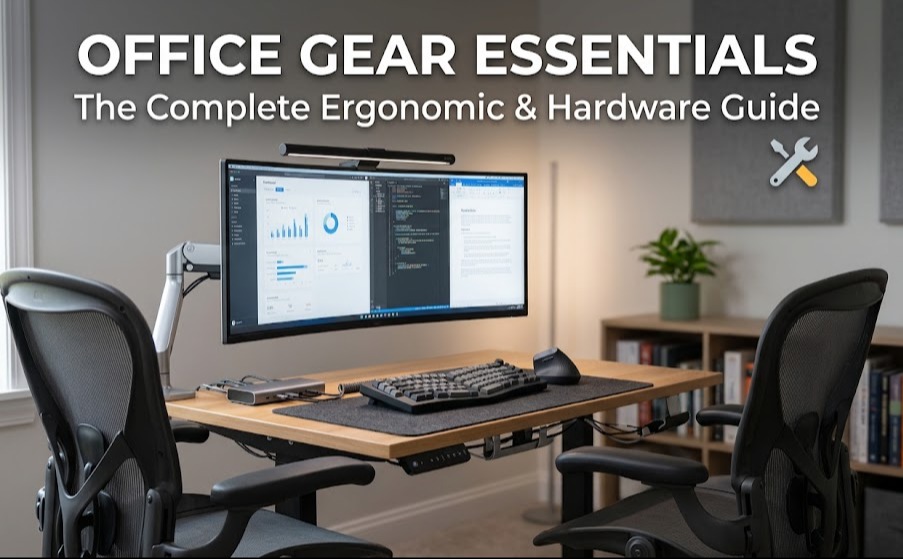
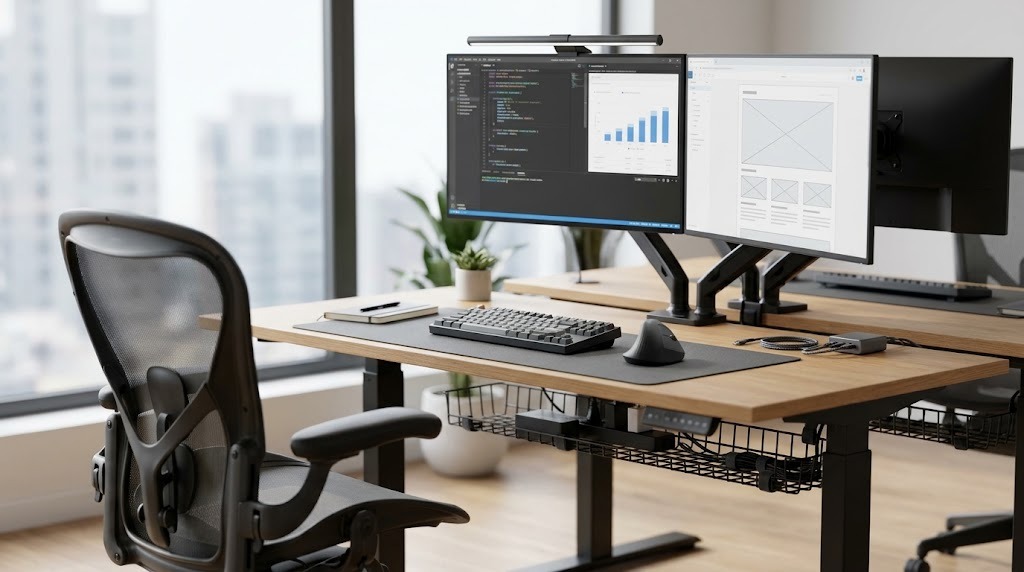
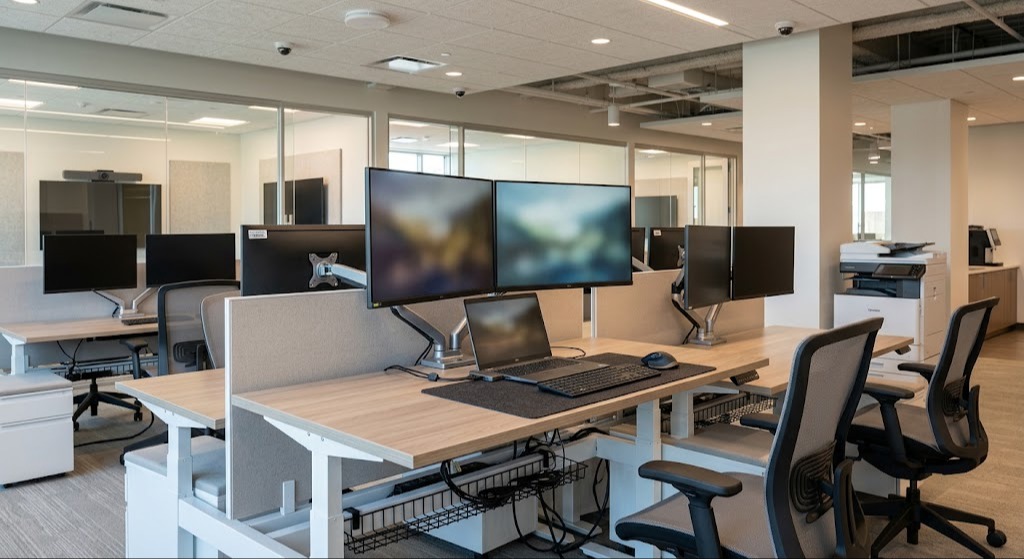
- Displays and Display Mounts: Dual 27-inch 2560×1440 (QHD) IPS panels or single 34-inch ultrawide panels with integrated 90W+ Power Delivery (PD) over USB-C. Ensure monitors include VESA 100×100mm mounting patterns and are secured by articulating counterbalanced gas-spring monitor arms.
- Workstation Docking Stations: Thunderbolt 4 docks capable of driving dual external displays at 60Hz while routing gigabit Ethernet, peripheral USB-A ports, 3.5mm audio, and host laptop charging over a single tethered cable.
- Input Peripherals: Commercial chiclet or mechanical keyboards with 104-key layouts and low-noise switches (e.g., Cherry MX Silent Red) paired with ergonomic, high-DPI optical mice capable of multi-device Bluetooth/2.4GHz RF pairing.
- Individual Surge Suppression: Under-desk commercial power distribution units (PDUs) with a minimum 1,500-Joule rating and integrated circuit breakers to prevent localized overcurrent trips.
2. Core Network, Cabling, and Power Distribution
Commercial networks require dedicated enterprise-grade switching, segmented routing, and uninterruptible power. Consumer networking gear cannot handle enterprise device density, Quality of Service (QoS) packet prioritization, or virtual LAN (VLAN) security isolation.
- Structured Cabling Infrastructure: Category 6A (Cat6A) 23 AWG 4-pair unshielded or shielded twisted pair (UTP/STP) cabling. Cat6A guarantees 10 Gigabit Ethernet (10GBASE-T) transmissions up to 100 meters, future-proofing high-bandwidth access points and data arrays. Run two drops minimum to every individual desk location.
- Enterprise Core and Access Switches: Layer 2+ and Layer 3 managed switches equipped with Power over Ethernet Plus (PoE+ / 802.3at) and PoE++ (802.3bt). Calculate the total PoE wattage budget to ensure adequate power for access points, VoIP phones, and smart access panels simultaneously.
- Wireless Access Points (APs): Enterprise Wi-Fi 6E or Wi-Fi 7 access points equipped with 4×4 Multi-User MIMO (MU-MIMO) radios and dedicated scanning radios for WPA3 Enterprise authentication and Rogue AP detection.
- Unified Threat Management (UTM) Gateway / Firewall: Dual-WAN enterprise routers supporting automated failover, active-active SD-WAN routing, stateful packet inspection (SPI) at 2.5 Gbps+ throughput, and hardware-accelerated IPSec/WireGuard VPN termination.
- Uninterruptible Power Supply (UPS) Arrays: Online double-conversion rackmount UPS units in the Main Distribution Frame (MDF) and Intermediate Distribution Frames (IDF). Ensure sufficient battery runtime (minimum 15–30 minutes at full load) to bridge generator activation or trigger graceful server shutdowns via Network Management Cards (NMC).
3. Unified Communications, AV, and Meeting Spaces
Conference room hardware must be acoustically matched to the physical room volume and engineered for platform-agnostic interoperability (Microsoft Teams Rooms, Zoom Rooms, Webex).
- All-in-One Video Bars: 4K PTZ (pan-tilt-zoom) or multi-camera optical arrays featuring automatic speaker framing, group auto-framing, and beamforming microphone arrays with acoustic echo cancellation (AEC) effective up to a 20-foot radius.
- Room Scheduling Displays: 7-to-10-inch PoE-powered touch panels mounted externally to conference rooms, interfacing directly with Google Workspace or Microsoft Exchange to resolve physical room contention.
- Interactive Touch Displays: 65-to-85-inch 4K UHD commercial anti-glare interactive displays featuring zero-bonding glass, 20-point touch matrices, and optical character recognition for real-time collaborative whiteboarding.
- Acoustic Treatment Panels: High-density open-cell polyurethane foam or fiberglass acoustic wall panels with a minimum Noise Reduction Coefficient (NRC) of 0.85, eliminating flutter echo in glass-walled meeting rooms.
4. Ergonomic Furniture and Physical Architecture
Sedentary physical work demands adjustable, compliant structural furniture designed to withstand continuous 24/7 commercial utilization cycles.
| Asset Type | Engineering Specification | Standard Compliance | Target Adjustment Range |
| Sit-to-Stand Desks | Dual-motor, 3-stage lifting columns; minimum 250 lbs lift capacity; anti-collision sensors. | ANSI/BIFMA X5.5 | Height range: 22.6″ to 48.7″ to accommodate 5th to 95th worker percentiles. |
| Ergonomic Task Chairs | High-performance elastomeric mesh; multi-axis adjustable lumbar support; 4D armrests; synchronous tilt. | ANSI/BIFMA X5.1 | Seat height: 16″ to 21″; seat depth adjustment: minimum 2″ travel; tilt stop. |
| Conference Seating | Mid-back swivel seating with pneumatic lift and tilt tension; abrasion rating ≥100,000 double rubs (Wyzenbeek). | ANSI/BIFMA X5.11 | Fixed or 1D height-adjustable armrests; durable cast aluminum base. |
| Cable Management | Under-desk high-capacity wire baskets; articulating vertical cable vertebrae; floor grommets. | NFPA 70 (NEC) | Minimum 3-inch internal radius to prevent Cat6A bend radius violations. |
5. Document Handling, Physical Security, and Facilities
Physical security and records management are regulated by regulatory compliance frameworks (HIPAA, PCI-DSS, SOC 2 Type II) that mandate physical access controls and data destruction protocols.
- High-Security Document Destruction: Cross-cut or micro-cut commercial shredders meeting DIN 66399 Level P-4 (particle size ≤ 160 mm² for confidential business files) or Level P-5 (particle size ≤ 30 mm² for proprietary R&D and financial data). Include continuous-duty motors with auto-oiling capabilities.
- Multifunction Enterprise Printers (MFPs): High-yield laser MFPs rated for 45–60 Pages Per Minute (PPM) with secure PIN release, badge-swipe LDAP authentication (NFC/RFID), automated dual-sided scanning, and an operating duty cycle of 150,000+ pages per month.
- Access Control Infrastructure: Role-Based Access Control (RBAC) smart door controllers supporting encrypted credentials (MIFARE DESFire EV3, OSDP protocol, or mobile BLE credentials) combined with fail-secure magnetic locks tied to the central fire suppression panel for emergency egress.
- Physical Surveillance Systems: NDAA-compliant IP security cameras capturing 4K resolution at 30 FPS, utilizing H.265 compression, wide dynamic range (WDR), and infrared illumination. Ensure video management systems (VMS) store 30–90 days of continuous local or immutable cloud retention.
What Infrastructure, Power, and Thermal Requirements Must Be Prepared First?
Deploying office equipment without calculating structural, electrical, and thermal parameters leads to hardware degradation, premature capacitor failures, and electrical fires. You must prepare the mechanical, electrical, and plumbing (MEP) infrastructure prior to receiving physical equipment shipments.
Electrical Circuit Mapping and Branch Loading
Standard commercial circuits in North America operate on 120-volt lines regulated by the National Electrical Code (NEC).
- The 80% Continuous Load Rule: Per NEC guidelines, a branch circuit breaker must not experience a continuous load (defined as lasting 3 hours or more) exceeding 80% of its rated capacity. A standard 15-Amp circuit (15A × 120V = 1,800 Watts) must not exceed 1,440 continuous Watts. A heavy-duty 20-Amp circuit (20A × 120V = 2,400 Watts) using NEMA 5-20R receptacles supports a maximum continuous load of 1,920 Watts.
- Workstation Power Envelopes: Calculate an average workstation draw of 150 to 200 Watts (Laptop: 65–100W; Dual Monitors: 60W; Desk motor burst: 150W momentary; Peripherals: 20W). Therefore, a single 20-Amp circuit must safely accommodate no more than 8 to 10 standard desk positions to prevent circuit breaker tripping under simultaneous load.
- Clean Power for the MDF/Server Closet: Install dedicated, isolated-ground 120V/208V 30-Amp circuits terminated with NEMA L5-30R or L6-30R twist-lock receptacles feeding your primary UPS arrays, isolating IT hardware from harmonic distortions created by elevator motors and HVAC compressors.
Thermal Dissipation and HVAC Calculations
Every active electrical component converts power into heat that must be extracted to maintain operational reliability.
$$\text{Total Heat Output (BTU/hr)} = \text{Total Operational Wattage} \times 3.41214$$
If your MDF rack draws 3,500 continuous Watts from switches, servers, and storage appliances:
$$3,500 \text{ Watts} \times 3.41214 = 11,942.5 \text{ BTU/hr of heat generation}$$
One Ton of refrigeration equals 12,000 BTU/hr. Consequently, this small closet requires a dedicated 1-Ton split-system precision air conditioning unit operating 24/7/365, independent of the building’s central comfort cooling schedules. Maintain the server closet between 64°F and 81°F (18°C to 27°C) with relative humidity levels between 40% and 60% non-condensing (per ASHRAE TC 9.9 Thermal Guidelines).
How Does the 5-Phase Procurement and Deployment Lifecycle Work?
Procuring and rolling out enterprise equipment follows a five-phase lifecycle: needs analysis, budgeting, vendor sourcing, deployment, and operational maintenance. Skipping structured transition gates between these phases introduces asset loss, budget overruns, and unmanaged hardware configurations.
Phase 1: Needs Assessment and Role-Based Tiering
Map equipment specifications to standardized employee personas rather than purchasing custom configurations on an ad-hoc basis.
- Tier 1 (Administrative / General Knowledge): Thin-and-light laptop, integrated graphics, 16GB RAM, dual 24-inch or single 27-inch monitor, standard ergonomic chair.
- Tier 2 (Engineering / Creative / Data Science): Mobile workstation or high-performance desktop, dedicated high-compute GPU, 32GB–64GB ECC/High-speed RAM, color-calibrated dual 27-inch 4K or 38-inch ultrawide monitors, enhanced cooling.
- Tier 3 (Field / Executive / Mobile): Ultra-portable enterprise laptop (under 2.5 lbs), integrated 5G LTE connectivity, extended battery capacity, noise-canceling enterprise Bluetooth headset, and universal compact travel docks.
Phase 2: Budget Allocation and Financial Structure
Determine the capital allocation strategy using financial modeling to balance cash reserves against balance sheet health. (Detailed procurement modeling is analyzed in Section 4.)
Phase 3: Procurement, Vendor Sourcing, and Master Service Agreements
Never acquire enterprise hardware via retail consumer storefronts. Engage authorized commercial hardware distributors (e.g., CDW, Insight, SHI) or OEM Direct Enterprise divisions (e.g., Dell Premier, Lenovo Enterprise, HP for Business).
- Require Competitive Bidding: Issue formal Requests for Quotations (RFQs) to a minimum of three Tier-1 authorized distributors for orders exceeding $25,000.
- Service Level Agreements (SLAs): Ensure all business-critical compute and networking hardware includes Next Business Day (NBD) on-site hardware support contracts, with a minimum duration of 36 months. Mission-critical server, firewall, and switching units require 24/7/365 4-hour on-site response SLAs.
Phase 4: Receiving, Asset Tagging, and Zero-Touch Configuration
Upon receipt of hardware, implement an automated chain of custody and device enrollment process.
- Physical Asset Tagging: Affix tamper-evident metalized polyester barcode or QR code asset tags (Code 128 format) to the chassis of every device valued over $100. Record the Serial Number, MAC Address, Model, Purchase Order (PO) Number, and assigned user in your IT Asset Management (ITAM) platform.
- Zero-Touch Provisioning (ZTP): Ensure vendor hardware registers directly into cloud enrollment portals upon dispatch: Apple Business Manager (ABM) for macOS/iOS devices, or Windows Autopilot via Microsoft Entra ID. When employees first unbox hardware and connect to the internet, company management profiles, disk encryption (FileVault/BitLocker), and endpoint security agents install automatically without IT personnel physically imaging the machines.
- Hardware Burn-In: Subject enterprise network switching, servers, and displays to a 48-hour continuous power-on “burn-in” test before operational deployment. Hardware component failures occur at their highest statistical rates within the first 100 operating hours (infant mortality stage of the classic Weibull reliability bathtub curve).
Phase 5: Lifecycle Maintenance, Auditing, and Patching
Active physical equipment requires continuous governance to maintain compliance, performance, and asset integrity.
- CMDB Reconciliation: Conduct quarterly physical and network inventory audits to reconcile real-world hardware locations against the Configuration Management Database (CMDB).
- Firmware Lifecycle Management: Schedule bi-annual firmware upgrades on managed switches, firewalls, and conference room AV bars to patch discovered CVE vulnerabilities and resolve interoperability bugs.
CapEx vs. OpEx: Which Financial Strategy Should You Choose?
Acquiring office equipment presents a strategic choice between outright capital expenditure (CapEx) and operational leasing (OpEx). The ideal strategy balances cash preservation, balance sheet optimization, and technological obsolescence cycles.
Direct Purchasing (CapEx)
Purchasing equipment outright grants immediate legal ownership, placing the hardware onto the corporate balance sheet as a fixed capital asset.
- Advantages: Avoids ongoing interest payments, recurring monthly administrative charges, and rigid end-of-term equipment return penalties. Provides unrestricted autonomy regarding equipment modifications, repairs, and secondary market disposition.
- Tax Mechanics: Under IRS Section 179, qualifying businesses can deduct the full purchase price of eligible business equipment up to statutory annual caps ($1,220,000 for qualifying property under modern schedules), rather than depreciating the asset incrementally over its operational life. Long-term assets utilize MACRS 5-year property schedules (for computing and networking) or 7-year schedules (for office furniture).
- Drawbacks: Requires substantial upfront capital reserves. The enterprise assumes 100% of the financial burden when hardware depreciates, breaks post-warranty, or becomes technologically obsolete.
Equipment Leasing (OpEx)
Leasing structures equipment acquisition as an operating service expense, spreading costs across monthly service payments.
- Fair Market Value (FMV) Leases: The enterprise pays a low monthly payment for a fixed term (typically 24 to 36 months). At term conclusion, the lessee can return the hardware, upgrade to current-generation technology, or purchase the equipment at its then-current fair market value. This structure prevents technological obsolescence in rapid-turnover assets (laptops, mobile phones, enterprise copiers).
- $1 Buyout Leases (Capital / Finance Leases): The company effectively finances the purchase over a fixed period. At the end of the term, ownership transfers completely for a nominal $1 fee. Monthly payments are higher than an FMV lease, but equity builds throughout the term.
- Tax Mechanics: FMV lease payments are fully deductible as recurring operational expenses (OpEx) on an ongoing monthly basis, circumventing complex corporate depreciation schedules.
Strategic Allocation Matrix: CapEx vs. OpEx
| Equipment Asset Category | Typical Lifespan | Recommended Method | Financial Justification |
| Computing (Laptops/Workstations) | 36–48 Months | OpEx (FMV Lease) | Rapid processor/battery obsolescence; continuous warranty coverage; predictable refresh cycles. |
| Enterprise Multifunction Printers | 36–60 Months | OpEx (Full Service Lease) | High mechanical wear; lease bundles toner replenishment and NBD technician support SLAs. |
| Core Switches & Network APs | 60–84 Months | Hybrid (CapEx or Cap Lease) | Infrastructure standards evolve slower; high residual value; long-term ROI. |
| Ergonomic Furniture & Desks | 120–180 Months | CapEx (Direct Purchase) | High durability; minimal technological obsolescence; qualifies for Section 179 deductions. |
| Conference Room AV Bars | 36–60 Months | OpEx (AV-as-a-Service) | Rapid shifts in video processing, AI audio tracking, and cloud conferencing room OS platforms. |
What Are the Typical Costs Per Seat Across Different Company Profiles?
Budget planning requires modeling total cost of acquisition (hardware, operating licenses, and deployment overhead) against headcount and functional requirements.
Archetype 1: The Solopreneur / Home Office (1 Seat)
- Design Philosophy: Redundant connectivity, zero footprint, commercial-grade ergonomic preservation for high-hour solitary use.
- Equipment Core: High-spec enterprise laptop ($1,500), single 34-inch curved USB-C hub display delivering 90W PD ($600), high-tier ergonomic task chair (e.g., Herman Miller Aeron, Steelcase Gesture) ($1,200), dual-motor sit-stand desk ($600), compact monochrome duplex laser printer ($250), 1000VA UPS backup ($150).
- Total Investment Range: $4,000 – $5,500 (One-time capital outlay).
Archetype 2: The High-Growth Startup / Regional Branch (10–50 Seats)
- Design Philosophy: Cloud-native architecture, rapid scalability, open-floor acoustic management, and standardized hardware pools.
- Workstation Allocation (Per Seat): Standardized laptop fleet ($1,100), dual 27-inch displays ($400), USB-C docks ($180), mid-tier ergonomic seating ($450), modular 60×30 benching desks ($400), accessories/power ($120). Subtotal per seat: ~$2,650.
- Shared Infrastructure Allocation: Cloud-managed network stack (Security Gateway, 48-port PoE+ switch, 3 Wi-Fi 6E APs) ($4,500), 2 Medium Conference Room AV Setups ($7,000), 2 Phone Booth Acoustic Pods ($9,000), Networked MFP ($2,500), Physical Access Control & Surveillance ($6,000).
- Total Investment Range: $35,000 – $160,000 (Blending CapEx furniture with OpEx hardware leasing).
Archetype 3: The Enterprise Corporate Campus (100+ Seats)
- Design Philosophy: High security, high redundancy, strict regulatory compliance, low ongoing maintenance overhead.
- Workstation Allocation (Per Seat): Managed enterprise laptop leases ($65/user/month), enterprise dual-screen monitor arms ($500 upfront), commercial task seating with 12-year 24/7 warranties ($800), enterprise structural power desks ($700).
- Shared Infrastructure Allocation: Redundant dual-chassis core switches, 10G fiber distribution, server room environmentals (CRAC units, 20kVA double-conversion 3-phase UPS), badge access gates, unified VoIP soft-switch infrastructure, automated AV conference suites.
- Total Investment Range: $3,200 – $4,800 per seat equivalent initial year footprint, optimized heavily through master enterprise leasing agreements.
What Workplace Compliance, Safety, and Ergonomic Standards Apply?
Non-compliant office equipment setups introduce severe legal liabilities, workplace injuries, and structural violations during commercial building inspections.
OSHA Guidelines for Computer Workstations
The Occupational Safety and Health Administration (OSHA Section 5(a)(1) General Duty Clause) holds employers responsible for preventing Musculoskeletal Disorders (MSDs) such as carpal tunnel syndrome, cervical radiculopathy, and lumbar strain.
- Elbow and Forearm Alignment: Worksurface and keyboard tray height must permit operators to maintain upper arms hanging naturally vertically, forearms parallel to the floor, and wrists straight in a neutral posture (elbow angle between 90° and 120°).
- Visual Ergonomics: Position displays directly in front of the operator, with the top line of text at or slightly below eye level (approximately 15° to 20° below horizontal line of sight). The viewing distance must equal roughly an arm’s length (20 to 28 inches) to eliminate neck flexion and eye fatigue.
- Supportive Seating Ergonomics: Chairs must provide lumbar support aligned to the inward curve of the lower spine (L1–L5 vertebrae), a waterfall front edge to alleviate pressure on the popliteal space behind the knees, and adjustable armrests that support the arms without forcing the shoulders into elevation.
Americans with Disabilities Act (ADA) Physical Space Requirements
Title III of the ADA dictates spatial dimensions surrounding all commercial furnishings and pathways.
- Corridor and Egress Travel Paths: Aisle ways between desk benches, partitions, and communal storage must maintain a clear, continuous, unobstructed path of travel of no less than 36 inches (915 mm). Where two wheelchairs pass simultaneously, a 60-inch (1,525 mm) clear width is required.
- Worksurface Accessibility: At least 5% (and never less than one) of all deployed workstations must accommodate wheelchair access: providing a clear floor space of 30×48 inches, a desk height between 28 and 34 inches above the finished floor, and an unobstructed knee clearance depth of at least 19 inches with a minimum 27-inch vertical clearance.
NFPA Life Safety and Structural Codes
The National Fire Protection Association (NFPA 101 Life Safety Code) regulates the placement of physical furnishings relative to fire response paths.
- Exit Access Minimums: No desk, filing cabinet, or equipment trolley may impede direct access to primary fire doors or egress paths.
- Extension Cord Prohibitions: NFPA 70 and OSHA explicitly forbid utilizing flexible extension cords or temporary power strips (relocatable power taps) as substitutes for fixed structural branch wiring. Power strips must be permanently UL-listed (UL 1363), plugged directly into a fixed wall receptacle, and must never be daisy-chained in series.
How Should You Decommission and Responsibly Dispose of Old Office Equipment?
Decommissioning legacy equipment is a critical security and environmental milestone. Failure to rigorously sanitize media exposes intellectual property, while dumping electronics incurs heavy environmental regulatory penalties.
NIST SP 800-88 Rev. 1 Data Sanitization Standards
Formatting a hard drive or restoring an operating system does not sanitize data. The National Institute of Standards and Technology (NIST) establishes three escalating levels of data sanitization:
- Clear: Overwriting storage media with non-sensitive logical data across all addressable locations using programmatic tools. Effective against simple keyboard attacks; insufficient against lab-level forensic reconstruction.
- Purge: Executing cryptographic erase protocols (such as ATA Secure Erase or NVMe Sanitize commands) to overwrite internal media structures, or exposing magnetic storage to high-intensity degaussing fields. Purge actions render data recovery impossible using state-of-the-art laboratory techniques.
- Destroy: Total physical destruction of the hardware substrate through commercial cross-cut shredding (reducing platter fragments to under 2mm), incineration, or acid bath dissolution. Mandatory for drives containing classified or strictly regulated customer personal health information (PHI/HIPAA).
Hardware Chain of Custody Documentation
Before hardware leaves corporate facilities, generate a tamper-evident Asset Disposition Log containing:
- Asset Tag Number, Serial Number, MAC address, and Drive Serial Numbers.
- Verified date, time, and operator ID executing the NIST sanitization.
- An exportable Cryptographic Erasure Certificate tied to the unique serial number of each storage medium.
Certified E-Waste Recycling (R2v3 and e-Stewards)
Commercial enterprises face heavy liabilities under the Resource Conservation and Recovery Act (RCRA) for disposing of toxic heavy metals (lead, cadmium, mercury, lithium) in municipal landfills.
- Mandatory Partner Certification: Partner exclusively with downstream IT Asset Disposition (ITAD) vendors holding active R2v3 (Responsible Recycling) or e-Stewards certifications.
- Audit Protocols: Certified recyclers must provide a documented chain-of-custody paper trail and formal Certificates of Recycling, guaranteeing that zero electronic waste enters domestic landfills or is illegally exported to non-OECD developing nations.
What Are the Most Common Office Equipment Procurement Mistakes?
Even experienced procurement managers frequently stumble over common engineering, ergonomics, and cost traps.
1. Procuring Consumer-Grade Hardware to Conserve Budget
Purchasing consumer-tier laptops, networking gear, or printers from retail box stores creates maintenance nightmares. Consumer devices lack enterprise management interfaces (e.g., Intel vPro for bare-metal remote remediation), run non-standardized chipsets that complicate enterprise disk imaging, and feature components built for low-cycle utilization. The marginal 15% upfront savings is erased by the first enterprise troubleshooting ticket or premature component failure.
2. Overlooking Total Cost of Ownership (TCO) in Printing
Low upfront acquisition costs on desktop inkjet or entry-level laser printers obscure long-term operational costs. Low-end print engines use low-yield cartridges costing $0.08 to $0.14 per black-and-white page, and up to $0.25 per color page. Commercial enterprise laser MFPs under managed print contracts yield operational costs of approximately $0.01 to $0.015 per monochrome page and $0.05 to $0.07 per color page, inclusive of consumables and preventative maintenance. A business printing 5,000 pages per month will lose thousands of dollars per machine over a 3-year operating window if they choose cheap hardware.
3. Daisy-Chaining Extension Cords and Power Taps
Plugging multi-outlet power strips into other power strips to extend power across clusters of open-plan desks is a direct violation of OSHA 1910.303(b)(2) and NFPA 70. This practice leads to electrical fires, resistance heating, and unpredictable voltage drops that damage delicate computing power supply units (PSUs). Always run structured electrical drops, under-carpet bus tracks, or ceiling-fed modular electrical power poles directly to clusters of desks.
4. Designing Without Cable Bend Radius and Structural Envelopes
Stuffing Cat6A structured cabling tightly into sharp structural corners or cramming bundles tightly inside narrow furniture cable tracks degrades network transmission. Cat6A features a thicker, stiffer jacket and internal cross-splines; it requires a strict minimum bend radius of 4 times the outside cable diameter (approximately 1.2 to 1.5 inches). Bending cables sharply breaks internal twisting spacing, generating severe alien near-end crosstalk (ANEXT) and packet drops that reduce 10Gbps links to intermittent 100Mbps connections.
Frequently Asked Questions
What is the average lifespan of physical office equipment?
Commercial desktop and laptop computers average a 3-to-4-year (36–48 month) lifecycle before battery degradation and hardware obsolescence warrant replacement. Enterprise networking switches, structured cabling, and server racks operate reliably for 7 to 10 years. ANSI/BIFMA-rated commercial desks and task seating maintain operational integrity for 10 to 15 years under typical multi-shift wear.
How many network access points do I need for my office space?
As an operational standard, allocate one enterprise Wi-Fi 6E/7 access point per 1,500 to 2,000 square feet of open office space, or for every 30 to 40 active concurrent wireless devices. In dense environments with concrete or double-pane acoustic glass partitions, conduct a physical RF predictive heat-map audit to account for structural signal attenuation.
Can an employer require employees to use specific ergonomic equipment?
Yes. Employers retain the legal right and responsibility under OSHA regulations to mandate the use of ergonomically sound equipment to mitigate workplace repetitive strain injuries. Organizations can enforce the use of company-issued seating, external displays, and keyboard trays while disallowing non-compliant personal furniture within corporate facilities.
What is the difference between Cat6 and Cat6A network cabling?
Cat6 cabling supports frequencies up to 250 MHz and can deliver 10 Gigabit data speeds only across short distances up to 55 meters (180 feet). Cat6A (Augmented) operates at frequencies up to 500 MHz and guarantees full 10 Gigabit speeds across the entire 100-meter (328-foot) channel, while featuring improved internal shielding to eliminate electromagnetic interference.
How much electrical power should I allocate per employee workstation?
Allocate an electrical capacity budget of 150 to 200 Watts for a standard knowledge-worker workstation running an enterprise laptop, dual external monitors, dock, and phone. For specialized engineering or media rendering workstations driving multi-GPU systems and triple 4K monitors, budget 500 to 750 Watts per desk.
Are equipment leases considered assets or liabilities under modern accounting rules?
Under ASC 842 and IFRS 16 lease accounting standards, virtually all commercial operating leases must now appear on corporate balance sheets. Lessees must record a “Right-of-Use” (ROU) asset representing the right to use the underlying hardware and a corresponding lease liability reflecting the present value of future lease payments.