
Office cable management is the systematic practice of organizing, routing, and concealing electrical, data, and peripheral cables within a workspace. This structural framework protects hardware from mechanical strain, prevents thermal throttling of power adapters, and eliminates physical tripping hazards while establishing an optimized environment for future technological scaling.
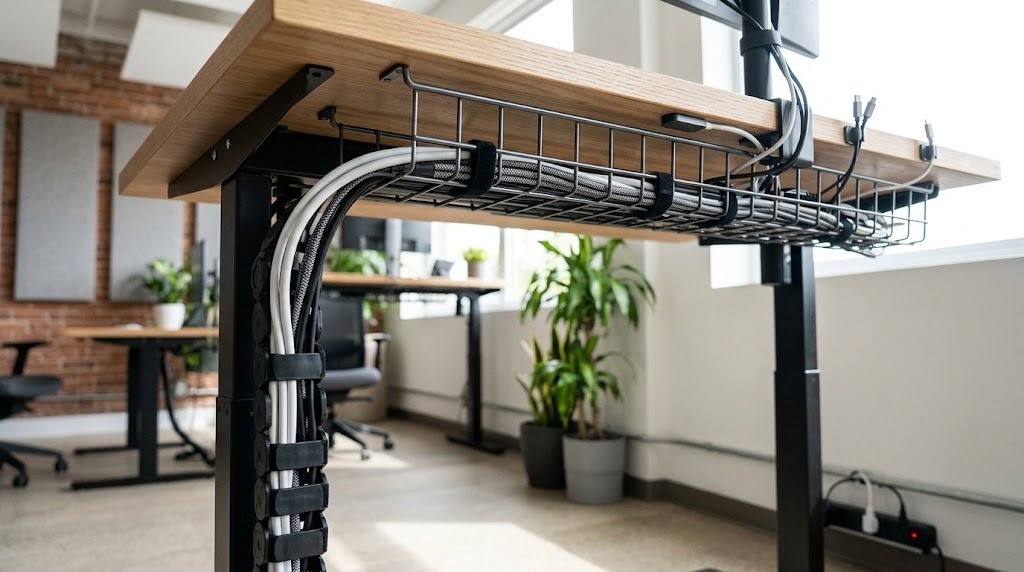
Key Facts / Quick Answer:
- Core Objective: Centralize disparate wires into isolated, structural pathways (horizontal trays and vertical spines).
- Clearance Requirements: Power bricks require a 2-inch ambient air gap to prevent thermal failure.
- Signal Protection: Unshielded Ethernet (Cat6) must run 6 to 8 inches away from AC power lines to prevent electromagnetic interference (EMI).
- Cost Range: DIY adhesive kits start at $15; premium integrated sit-stand systems exceed $120.
- Implementation Time: Retrofitting a single desk requires 20 to 45 minutes; enterprise quad-clusters require 2 to 3 hours.
How Does Office Cable Management Work?
Office cable management works by centralizing disparate electronic pathways into defined structural channels. Devices connect to local desktop interfaces, route horizontally along weight-bearing under-desk trays, and travel vertically via flexible sleeves or spines to wall outlets. This mechanical diversion transfers the physical weight of heavy copper lines and power adapters away from fragile device ports and onto the furniture frame.
By isolating different cable categories into distinct spatial layers, structural management prevents tangled knots that trap ambient heat. A properly deployed system maintains individual cable slack independently, meaning a worker can pull a mouse cord or adjust a monitor arm without pulling the primary power strip out of the wall.
What Are the Key Hardware Components?
The key hardware components consist of horizontal trays, vertical spines, and micro-fasteners designed to secure cables against gravity. Selecting the appropriate materials dictates the maximum weight capacity, thermal dispersion rate, and visual aesthetic of the final workstation.
Horizontal Trays and Enclosures
Horizontal supports anchor the bulk of cable weight directly to the underside of the desk surface.
- Steel Wire Baskets: Open-mesh metal systems that provide maximum ambient ventilation. These are mandatory for housing high-draw laptop power bricks that require airflow.
- Solid Enclosed Boxes: Plastic or sheet metal channels designed for total visual concealment. They block dust accumulation but trap heat, making them suitable only for low-voltage data cables.
Vertical Drop Solutions
Vertical solutions safely bridge the gap between the moving desk surface and the static floor outlet.
- Vertebrae/Spines: Interlocking plastic segments that bend dynamically in a single plane. They protect cables from snagging in desk legs during height adjustments.
- Fabric Sleeves: Zippered neoprene wraps that bundle multiple cords into a single unified column. These are ideal for fixed-height desks requiring a low visual footprint.
Fasteners and Desktop Anchors
Fasteners handle the micro-routing of individual lines before they reach the main structural channels.
- Hook-and-Loop (Velcro) Ties: Reusable fabric strips that bundle lines securely without cutting into the plastic sheathing.
- Adhesive Clips: Desktop routing points that capture active charging lines (USB-C, Lightning) to prevent them from sliding behind the furniture when disconnected.
Comparing Office Cable Management Hardware
| Material Type | Best Application | Typical Lifespan | Primary Advantage | Primary Limitation |
| Mesh Wire Trays | Heavy power bricks | Indefinite (Steel) | Superior ventilation; allows modular cable weaving. | Leaves cords partially visible from low angles. |
| Enclosed Boxes | Visual cleanup | 5–10 Years | Seamless aesthetic; protects against dust. | Traps heat; highly difficult to swap single lines. |
| Velcro Straps | Dynamic bundling | Reusable (High) | Zero compression damage; infinitely adjustable. | Provides no structural weight-bearing support. |
| Zip Ties | Permanent tracks | Single-use | Ultra-low profile; exceptional binding strength. | Pinches data fibers; requires tools to modify. |
| Vertebrae Spines | Sit-Stand Desks | 10+ Years | Moves fluidly without snagging frame actuators. | High financial cost; bulky visual footprint. |
How to Install an Office Cable Management System
Installing a robust system requires a structured, phased approach of auditing, structural mounting, and layered routing. Attempting to manage cables while devices remain powered and plugged in consistently results in crossed lines and improper tension.
- The 10-Minute Audit and Inventory: Disconnect all devices from power and data sources. Categorize equipment into active, charging-only, and redundant piles. Remove all obsolete connections.
- Extreme Movement Measurements: For sit-stand models, raise the desk to its maximum vertical height. Map the total lift travel, monitor arm rotation radii, and the exact distance to the primary wall outlet.
- Mount Structural Elements: Install under-desk trays and vertical routing spines while the desktop is entirely bare. Secure these foundations using heavy-duty screws or specialized clamps.
- Anchor the Central Hub: Mount the primary surge protector directly to the underside of the desktop. This ensures all peripheral power bricks travel synchronously with the desk surface, requiring only one heavy gauge cable to drop to the wall.
- Route in Independent Layers:
- Layer 1 (Desktop): Guide mouse, keyboard, and audio lines into surface-level adhesive clips.
- Layer 2 (Horizontal): Bundle heavy power adapters and excess cable slack securely into the wire tray.
- Layer 3 (Vertical): Consolidate the main surge protector cable and Ethernet line down into the vertebrae spine.
- Dynamic Slack Testing: Actuate the standing desk to its highest and lowest mechanical limits. Verify that no single cord experiences sharp tension, pinches against the steel frame, or disconnects under strain.
What Are the Critical Safety Standards?
Critical safety standards dictate strict thermal clearances, electromagnetic isolation, and specific physical bending limits to prevent hardware failure and workplace hazards. Ignoring these metrics violates OSHA workplace safety guidelines and degrades equipment performance.
Thermal Airflow and Power Separation
High-draw power supplies (like 140W laptop chargers) output significant heat. Practitioners must maintain a minimum 2-inch open air gap around these bricks inside wire trays. Furthermore, unshielded data pathways (Cat5e/Cat6) must route at least 6 to 8 inches away from high-voltage AC lines. If data and power must intersect, they must cross at strict 90-degree angles to cancel out electromagnetic interference (EMI) that causes data packet loss.
Cable Bending Radii Limits
Every data cable possesses a maximum bend radius before the internal copper or glass fibers fracture. For standard Cat6a ethernet cables, the bend radius must never exceed four times the outer diameter (OD) of the cable jacket. Sharp 90-degree folds inside structural trays permanently destroy data throughput capabilities.
Expert Insight: Never daisy-chain surge protectors under a desk to reach a wall outlet. This directly violates UL 1449 safety ratings and fire codes, overloading the primary unit’s amperage limit and instantly voiding commercial insurance policies in the event of an electrical fire.
Common Cable Management Installation Mistakes
- Mistake 1: Tension-Locking at Maximum Height. Failing to leave a slack loop on adjustable desks guarantees port destruction. Fix: Perform the final hook-and-loop tightening phase only while the desk is raised to its absolute highest standing configuration.
- Mistake 2: Over-tightening Plastic Zip Ties. Cinched plastic cuts directly into the internal shielding of fiber optic and peripheral cables. Fix: Eliminate zip ties entirely; utilize reusable fabric hook-and-loop wraps for all internal desk routing.
- Mistake 3: Overloading Weak Adhesives. Mounting heavy 8-outlet surge protectors to raw particleboard using standard foam tape results in sudden drops. Fix: Clean the desk surface with isopropyl alcohol, apply high-bond 3M VHB tape, and allow a 72-hour curing period before applying weight.
Strategies for Specific Workspace Profiles
Different occupational environments demand distinct hardware configurations based on mobility, equipment volume, and ownership limitations.
- The Minimalist and Renter: Utilize heavy-duty clamp-on under-desk trays combined with magnetic surface clips. This non-destructive strategy requires zero drill holes and leaves the furniture pristine upon moving.
- The Standing Desk Power-User: Invest in an integrated, high-capacity metal channel tray paired with a weighted, floor-anchored vertical vertebra. Anchor the main UPS (Uninterruptible Power Supply) inside the tray to protect against sudden power loss during movement.
- The IT Enterprise Space: Specify and mandate pre-configured workstations with built-in, factory-milled structural pathways. IT policies must isolate high-voltage distribution from low-voltage network lines in dual-chambered trays from the initial day of deployment.
Frequently Asked Questions About Office Cable Management
How do you manage cables on a glass desk?
Managing cables on a glass desk requires avoiding drill-mounted hardware. Instead, utilize heavy-duty clamp-on wire trays and adhesive-backed cable channels. Practitioners must apply 3M VHB tape to clean glass for surge protectors, ensuring the combined weight does not exceed the tape’s sheer strength rating.
Can you daisy-chain surge protectors under a desk?
You must never daisy-chain surge protectors or power strips. Connecting multiple power distribution units together violates OSHA regulations and fire codes. This practice overloads the primary unit’s amperage rating, significantly increasing the risk of electrical fires and instantly voiding equipment warranties and insurance policies.
How much does professional office cable management cost?
Entry-level consumable kits cost between $15 and $20, providing basic adhesive clips and velcro ties. Heavy-duty under-desk metal trays range from $25 to $50 per section. Premium integrated setups with metal channels, weighted vertebrae, and built-in power modules typically cost between $75 and $120.
What is the best way to label office cables?
The best practice for labeling is using heat-shrink tubing or durable wrap-around flag labels positioned exactly two inches from both the device and power ends. Technicians should implement a standardized color-coding system, separating data pathways from electrical lines for faster troubleshooting and maintenance.
How often should cable systems be audited?
Workstation cable networks require a structural audit every six to twelve months. This routine inspection must verify that adhesive mounts remain secure, thermal clearances around power bricks are uncompromised, and sit-stand desk mechanisms are not creating new tension points on data lines over time.